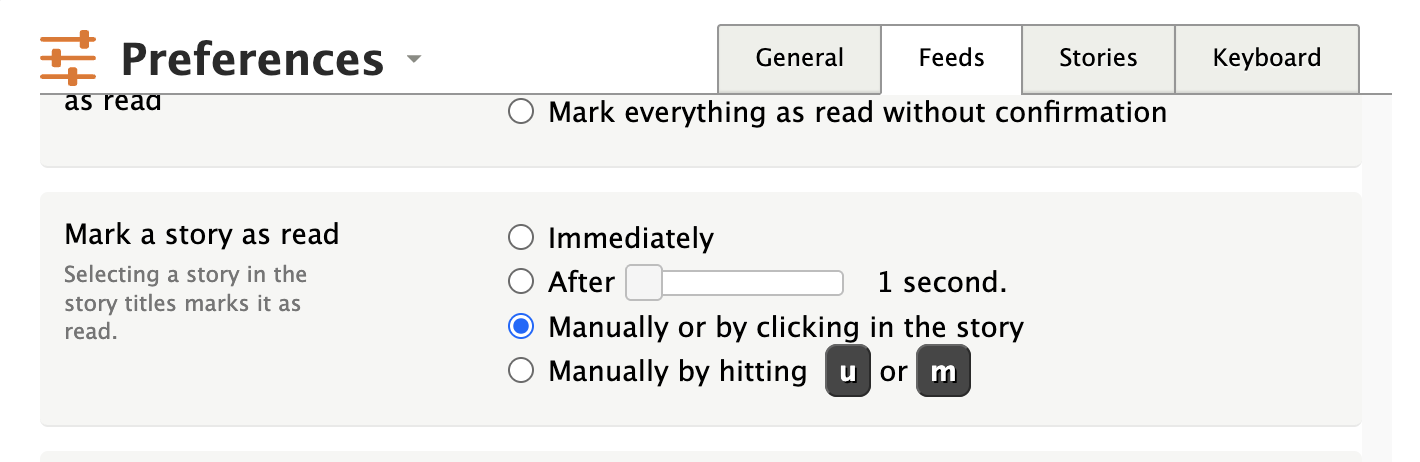
Hello! New to Newsblur after trying a couple of different RSS apps over the last couple of days. I’m nearly sold, except the ‘mark as read’ feature feels either slightly broken or counterintuitive?
I want total control over what I mark as read - I only want it to happen when I right click > ‘Mark as read’.
However, I can’t seem to do this because when I open a story, clicking anywhere in that story window marks it as read, except on embedded story elements.
- For instance, on a YouTube story, clicking the background or header marks it as read, but not the video. I don’t want any of my left clicks to do anything, and I’m having to navigate cautiously to avoid the ‘mark as read’ system on the left click.
- I have the ‘Mark a story as read’ setting set to manual on keypress only, but that didn’t seem to do anything. I can’t imagine what else this setting is supposed to do except change this behaviour… so it feels broken?
- This also means that even trying to add a manual tag to a story using the floating window on the right counts as a click, so marks the story as read, which is very frustrating!
I can’t work out if I’m encountering a settings bug / conflict, missing a setting, or just will not get on with the intended use case for the ‘mark as read’ system, which for my needs is overbearing. For such a flexible tool, I’d be surprised if I can’t reduce the ‘mark as read’ behaviours to fully intentional user actions only, like right click > ‘mark as read’.
Please let me know if I’m missing something! I love everything else this tool has to offer but this ‘mark as read on click’ issue is a big hurdle for me! Thanks!
I agree, this sounds like a bug! Just to confirm, this is on the web? I’ll try to repro and get this fixed later today.
On the web, yeah!
Let me know if there’s any video / debug I can send to help things along  thanks!
Hey emmakpark, you’re right – this is a bug! Found it and just pushed a fix.
The issue: the story detail pane had a click handler that was force-marking stories as read, completely bypassing the “manually mark as read” preference. So no matter what you had that setting set to, clicking anywhere in the story content would mark it as read.
The fix is live now. With your preference set to “Manually by hitting m or u”, clicking on stories and interacting with them should no longer mark them as read. Only pressing m or u will toggle read status.
Let me know if you’re still seeing the issue.
1 Like
Confirmed fixed - absolute star, thank you for being so speedy! 
Adding a little note here to say, it seems like right click > ‘mark as read’ now doesn’t work. It did earlier when I first tested this fix, but now stories will only mark as read when using the keybind. Maybe that’s intended with the keybind setting only selected, but I’d consider the right click > ‘mark as read’ as separate from left-clicking a story 
Desktop again. Did download and use the mobile app briefly since I tested this bug earlier and it worked, in case that’s related!
(Edit: right click > ‘mark as unread’ does work, however)!
Yep, that was inadvertently disabled. I changed manual mode to be explicit, but that means I now have to manually re-add any pathways that were turned off. This is now working again after I deployed. Reload and you should be good.
1 Like
web user here - still cannot click anywhere in story header to mark story as read (as could earlier today and forever before) but RIGHT clicking on headline (words directly) brings up context menu and allows mark as read - would love to go back to being able to LEFT click anywhere in header to mark story as read - thanks for your work Samuel!
Just a thought, is your ‘mark read on click’ setting under Preferences definitely still set to anything but the ‘manual on keypress’ setting?
(Mine’s on manual, of course, but might be worth double-checking just in case this fix exposed that it was set wrongly, or changed what it was set to)!
Ok, new option, because I like clicking but still having it be manual.
1 Like
You are THE BEST Samuel Clay - Thank you for this!
1 Like