Hi.
When viewing all entries in a folder, I’d love to be able to group/sort those entries by source instead of date.
Thanks.
Hi.
When viewing all entries in a folder, I’d love to be able to group/sort those entries by source instead of date.
Thanks.
So you want to be able to scroll through stories from multiple feeds as if you were reading them individually, but all at once. Nice idea, and something I’m not averse to. But it’s a big enough interface change that there’s no way I can make that happen immediately.
Sure I understand. If it’s on the list somewhere in the future that’s great 
Yes, it would be a “group-by Source than by Date”. Instead of having :
source A, day d-1
source B, day d-1
source A, day d-2
source B, day d-2
source C, day d-2
source A, day d-3
source B, day d-3
You’d have :
source A, day d-1
source A, day d-2
source A, day d-3
source B, day d-1
source B, day d-2
source B, day d-3
source C, day d-2
So when I’m scrolling down my stories, the context in my mind remains the same for 3 stories long, intead of switching back and forth from A mindset to B (I find it really annoying because I group my feed mainly by importance not by subject).
There’s a far larger change present there that may make it easier to do some of the other big changes like reading old to new, reading only unread stories, and making the river of news much faster. It’s to pull story ids and dates into my redis database and make the calculations far faster, so I know exactly which stories to pull out of the humongous mongodb.
This will have he effect of making most requests for river of news take less than 100 ms (0.1 sec), as opposed to the .1s - 20s today, depending on how many stories there are.
It’s a big change, but it will allow me to present your configuration quite easily. I think it’ll be the next big feature I attack after I finally ship social.
Oh, and more importantly, this gives me an order of magnitude more ability to scale.
Any update to this? This is a feature I need for my Google Reader replacement.
I miss this too 
That would still be a great feature. Pleeeaaase
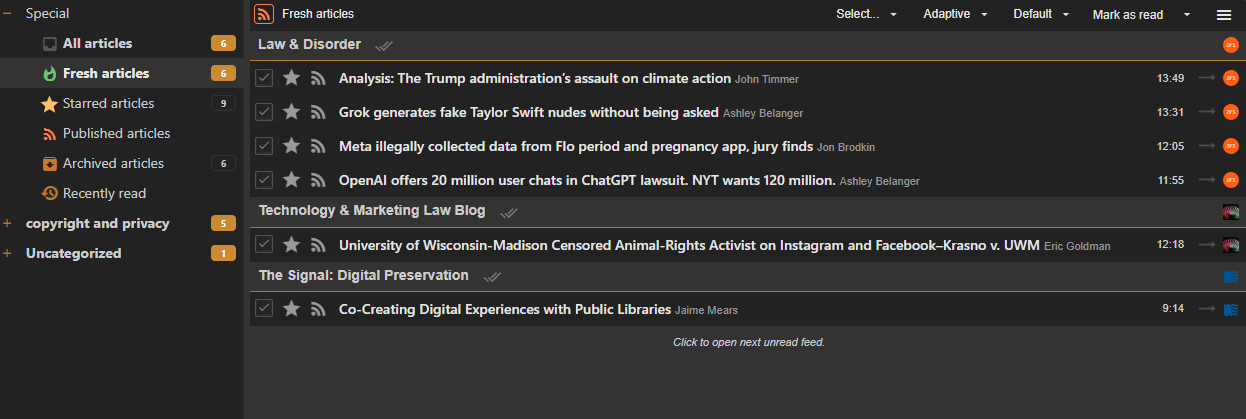
A user just emailed in that they would like to see this and here’s how it looks on another reader.
I have to ask, how does paging work? If a feed has 500 unreads, do we show a next page button per-feed? Only the newest/oldest X stories?
I’m the user who emailed.
I’m very fond of this feature in the self-hosted reader tt-rss, which I’m hoping to get away from. Another nice feature is that each feed heading has its own “mark all as read” button (the double-checkmark in the screenshot).
There’s no paging within each grouped feed. Instead, only a little more than one screen’s worth of content is loaded and ready to view. If you scroll down to the end, after the last item you get a “loading, please wait” message. After a short pause, the message is replaced with the top of another page of content which has been added to the current view, allowing you to resume scrolling down as if it had been there all along.
So, if there’s 500 to see in a particular feed, you’ll have to scroll through them all before you can see the next grouped feed.
It helps that this reader has filters to limit the amount of content you’re looking at. The default selection, instead of “All articles”, is “Fresh articles”, which is unread and just-read items less than x hours old, and the user can configure this number. It is very handy to just see what’s just been posted today, rather than including every post you missed since the last time you looked at the reader.
In any case, grouping by feed isn’t for everyone. When the feature was added to the non-free reader BazQux, they said “Some people prefer to read this way and it actually works quite well if you don’t have too many high volume feeds.”