<p>For years, if you wanted a “Connect to NewsBlur” button in your app, you had to email me your app’s name and redirect URL. I’d open the admin, register it by hand, and send the credentials back. Now you can do that yourself from <strong>Account → OAuth applications</strong> on the web. You need Premium Pro to register and run a new app. The people who connect to it can use any NewsBlur plan.</p>
What your readers will see
Say you’re building a little app for your book club. Each member connects their NewsBlur account and picks a saved story to bring to the next meeting. They sign in on NewsBlur, see what your app wants to read, and decide whether to give it access. Their password stays with NewsBlur.
Choose Create a new OAuth application and enter your app’s name, website, and redirect URL. That last one is the address in your app where NewsBlur sends a reader after they authorize it. As you type, you can see how the authorization link takes shape. Click Consent screen preview to see the page your readers will get.

Click Create application to get your client ID and secret. Copy the secret before closing the dialog. NewsBlur shows it once. The API docs walk through exchanging the authorization code for an access token.
Is anyone using it?
Come back to the same tab to see all your apps. Here’s the book club example after two people connected and the app made three requests on their behalf.
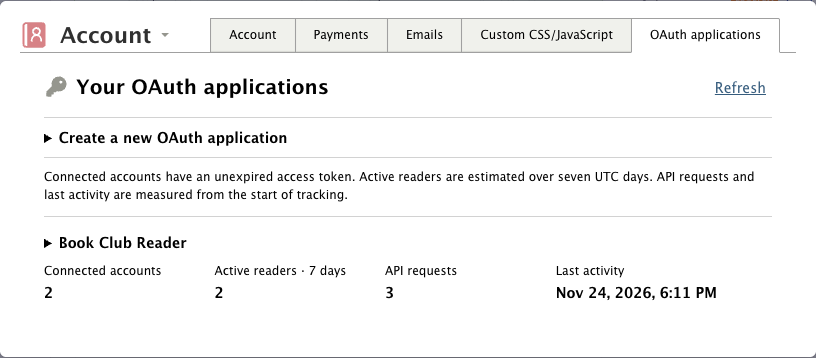
Connected accounts counts people whose access tokens are still valid. Active readers estimates how many different people your app made requests for over the last seven days. If one reader refreshes ten times, that’s ten requests and one reader. You can also see total requests since tracking began and when the last one came in.
If I registered your app before this launch, it can keep syncing on your current plan for now. I’ve also given lifetime Premium Pro to the developers of the feed readers listed in Goodies and to WinBlur.
What are you building with your NewsBlur stories? I’d love to see it on the NewsBlur forum.
This is a companion discussion topic for the original entry at https://blog.newsblur.com/2026/11/25/connect-your-app-to-newsblur-with-self-serve-oauth/