Hi Samuel. I’ve been a paying NewsBlur user for a while and love it. But I have one part of my use that’s frustrating me a lot, and has been for years to be honest.
I mostly use newsletters, and not feeds from sites or rss directly. That means that I’m relocating feeds to their appropriate subfolders all the time. I find there is friction in the following ways:
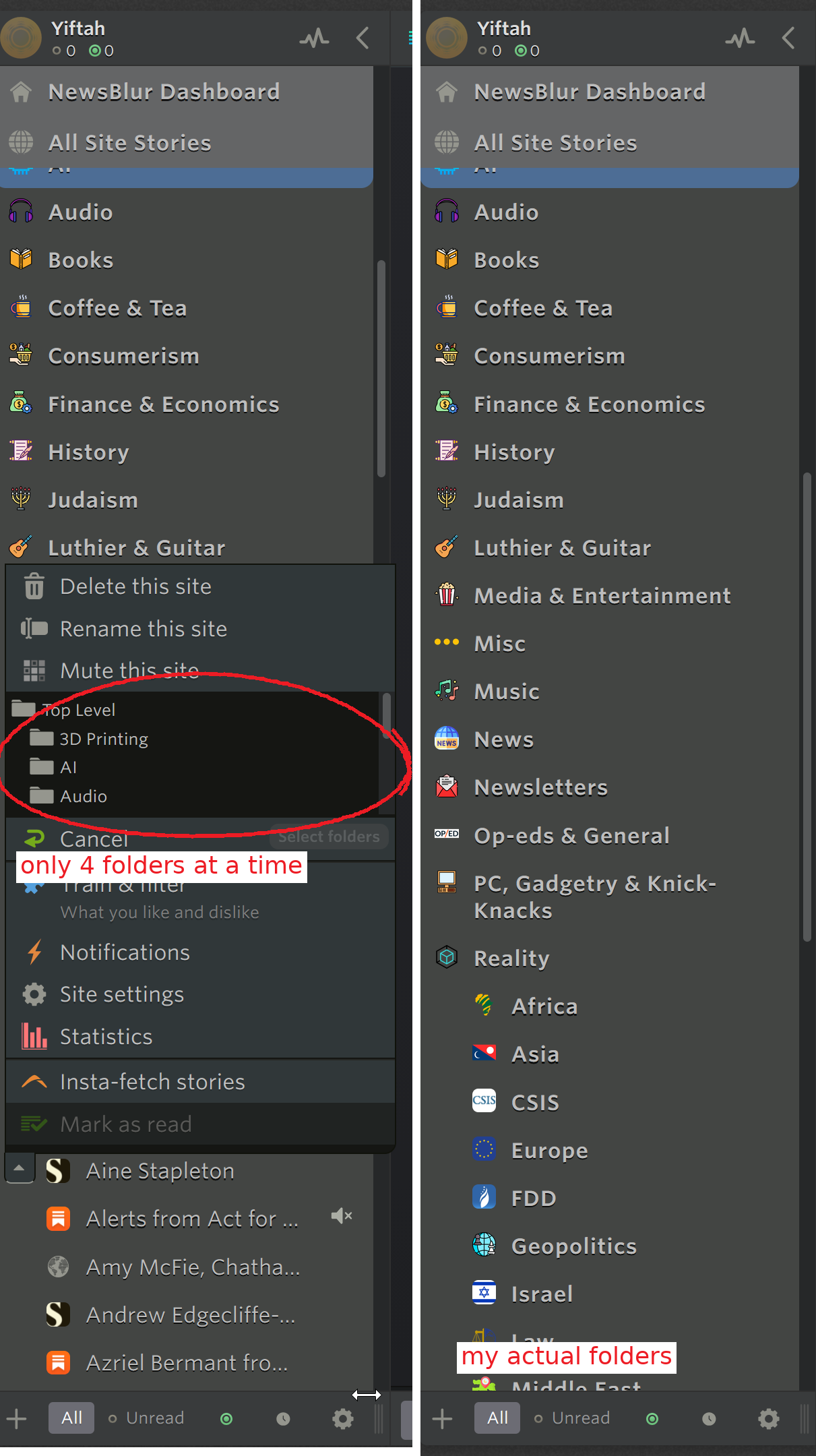
The biggest problem is that the folder list when relocating through the right click menu is tiny. It fits about four folders in it. I use a 4k 32 inch monitor, but the preview is still tiny. I have a lot of folders, and lots of screen real estate, but it’s not being used. And the preview window doesn’t use the custom icons I set for all my folders (thanks for adding that btw) but the default gray folder icon instead. I am dyslexic, and the icons are a big help to me, but when I most need them, when I have to sort through all my folders looking for the right specific folder, they are no longer available.
As I say, I mostly use newsletters, which means I usually am relocating away from the newsletter folder into a more appropriate one. The option to add one feed to multiple folders is useful, and I understand it, but it is a real PITA in this situation because I have to find the folder I want to switch to, select it, and then rescan the entire preview to find the newsletters folder and unselect it. I think perhaps one solution is to auto-open the preview for “Change Folders” to the folder the feed is currently in, that way I could quickly unselect Newsletters without having to manually scan for it, and then only look for the folder I want to move to without having to look for the newsletters folder too. Or maybe add an option to the settings to toggle off allowing feeds to be in multiple folders, that way if users like me who never set the same feed to be in more than one folder would just have to select the folder to move the feed to, and it would automatically relocate it without having to unselect the existing folder.
I am including an image I made of two screenshots. On the left you can see the folder picker dialogue open, exposing very few rows despite the large amount of screen real estate available, and on the right you can see an exerpt of the amount of folders I actually have (there are about 2 times more that arent shown) so you can see why this is a problem for people like me who have a lot of folders.
These are only suggestions, and I really appreciate the work that you do. This has just become a frustration large enough that I felt I had to mention it.